Product Roadmap & Support

Business Central product roadmap and support
Dynamics 365 Business Central (BC) is Microsoft’s business management application for small and mid-sized businesses that automates and streamlines processes. Learn more about the product roadmap and support for Business Central, both from Microsoft and Microsoft partners.
Business Central roadmap
Microsoft continues to invest in Dynamics 365 Business Central through new features, enhancements, and regular updates. The product receives two major updates annually, typically in April and October, along with minor updates throughout the year. In September 2026, Microsoft replaced its twice-yearly release wave roadmap publishing model with continuous updates through the AI at Work roadmap. Upcoming capabilities are now published as Microsoft commits to them, providing customers with more frequent visibility into planned functionality.
Microsoft’s key areas of investment include:
- AI-powered capabilities, including Copilot and autonomous agents
- Financial management and accounting improvements
- Manufacturing, inventory, and supply chain enhancements
- Electronic document processing and regulatory compliance
- Reporting, analytics, and integrations with Microsoft 365 and Power Platform
While roadmap publishing has changed, Business Central’s product update schedule remains the same. Customers can continue to expect major updates in April and October, with minor updates throughout the year.

Business Central online
Dynamics 365 Business Central online follows Microsoft’s Modern Lifecycle Policy, providing continuous support and servicing as long as customers meet Microsoft’s requirements. Microsoft manages application and platform updates to keep environments current and supported. Business Central receives two major updates annually, in April and October, along with minor updates throughout the year. Major updates introduce new features and enhancements, while minor updates typically include fixes, regulatory changes, and other improvements.
Microsoft generally makes major updates available to existing environments approximately one week after general availability. Administrators can schedule these updates within a five-month update period using the Business Central administration center, allowing time to test functionality, validate extensions, and prepare users. Administrators also have flexibility with minor updates, including the ability to skip intermediate versions. Organizations remain responsible for testing customizations, ensuring extension compatibility, and meeting Microsoft’s servicing requirements to maintain support.
Microsoft partners support Business Central
Microsoft sells and supports Business Central through their partner network. Microsoft partners are the providers of technical support for Business Central and those partners can escalate issues to Microsoft if necessary. The right Microsoft Dynamics 365 Business Central partner can assist you with applying the twice annual Microsoft updates, troubleshooting issues, creating customizations unique to your business, training users, and much more.

Microsoft partners support Business Central
Microsoft sells and supports Business Central through their partner network. Microsoft partners are the providers of technical support for Business Central and those partners can escalate issues to Microsoft if necessary. The right Microsoft Dynamics 365 Business Central partner can assist you with applying the twice annual Microsoft updates, troubleshooting issues, creating customizations unique to your business, training users, and much more.
Business Central on-premise
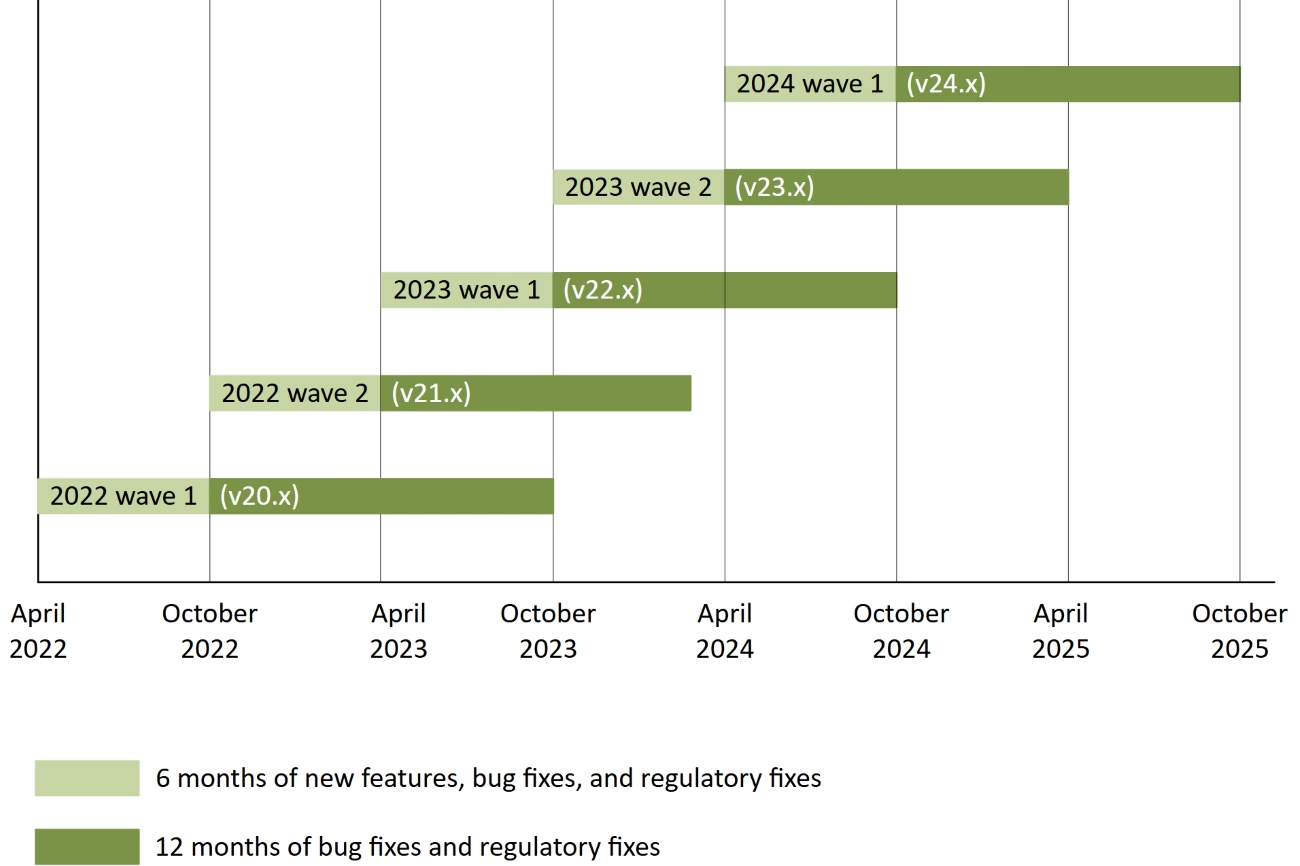
Dynamics 365 Business Central on-premises follows different support policies depending on the version. Releases from October 2018 and April 2019 fall under Microsoft’s Fixed Lifecycle Policy, while versions released in October 2019 or later follow the Modern Lifecycle Policy. Business Central version 14.x (April 2019) reached the end of mainstream support in October 2023 and extended support on October 15, 2025. Organizations still using this version should consider upgrading or migrating to a supported release.
Under the Modern Lifecycle Policy, Microsoft provides ongoing updates and servicing, but individual on-premises versions have defined support end dates. Unlike Business Central online, organizations are responsible for managing upgrades and maintaining supported versions. Customers should regularly review Microsoft’s Business Central on-premises lifecycle documentation to plan upgrades and maintain support.