
Dynamics 365 Business Central 2026 release wave 2 brings AI agent, reporting, Shopify, and subcontracting updates
Microsoft has published the full list of new and updated features in Business Central version 29.0, the October 2026 update that Microsoft labels 2026 release wave 2 for Dynamics 365 Business Central. It is also the first major Business Central update since Microsoft stopped publishing release plans in September 2026 and moved Dynamics 365 roadmap updates to the AI at Work roadmap. Major updates continue on the same cadence, but new capabilities are now disclosed on the roadmap as they are committed, and several features in this release carry later general availability dates there.
New Business Central online customers receive version 29.0 automatically, while existing customers can schedule the update at any point before February 2027. The update brings generally available agent experiences, reworked document reporting, and subcontracting improvements, although every Expense Agent enhancement and several finance features remain in public preview.
Copilot and AI agent updates in Business Central
AI remains the most visible investment area in Business Central, but the emphasis in this release has shifted from introducing new agents to making existing ones easier to supervise, govern, and trust.
- Agent task pane and on-page review reach general availability: Two agent experiences first covered in the Business Central spring 2026 update are now generally available. The dedicated task pane gathers suggestions, follow-ups, draft documents, and other agent-initiated actions in a single panel that can be opened from anywhere in Business Central, while on-page review lets users check agent-generated content directly where they are already working rather than switching to a separate view.
- Simpler agent permissions and interface updates: Microsoft lists easier agent permission management as generally available, with the AI at Work roadmap describing a process in which agents can request additional permissions and administrators assign them based on that request. The agent interface also groups agent avatars and adds a dedicated action for starting new tasks, while list pages can now display avatars for the users or agents that created and modified records, along with notifications when agent actions need review.
- More accurate purchase order matching in the Payables Agent: The Payables Agent now considers line amounts and expected receipt dates when matching vendor invoices to purchase order lines. This helps the agent distinguish between similar lines, particularly for services where quantity alone is rarely a reliable differentiator. Draft invoice warnings now flag amount differences as well as quantity differences, and the agent respects the existing Receipt on Invoice setting on purchase orders. A new vendor-level version of that setting flows down to new purchase orders and their lines, with each level able to override the one above it.
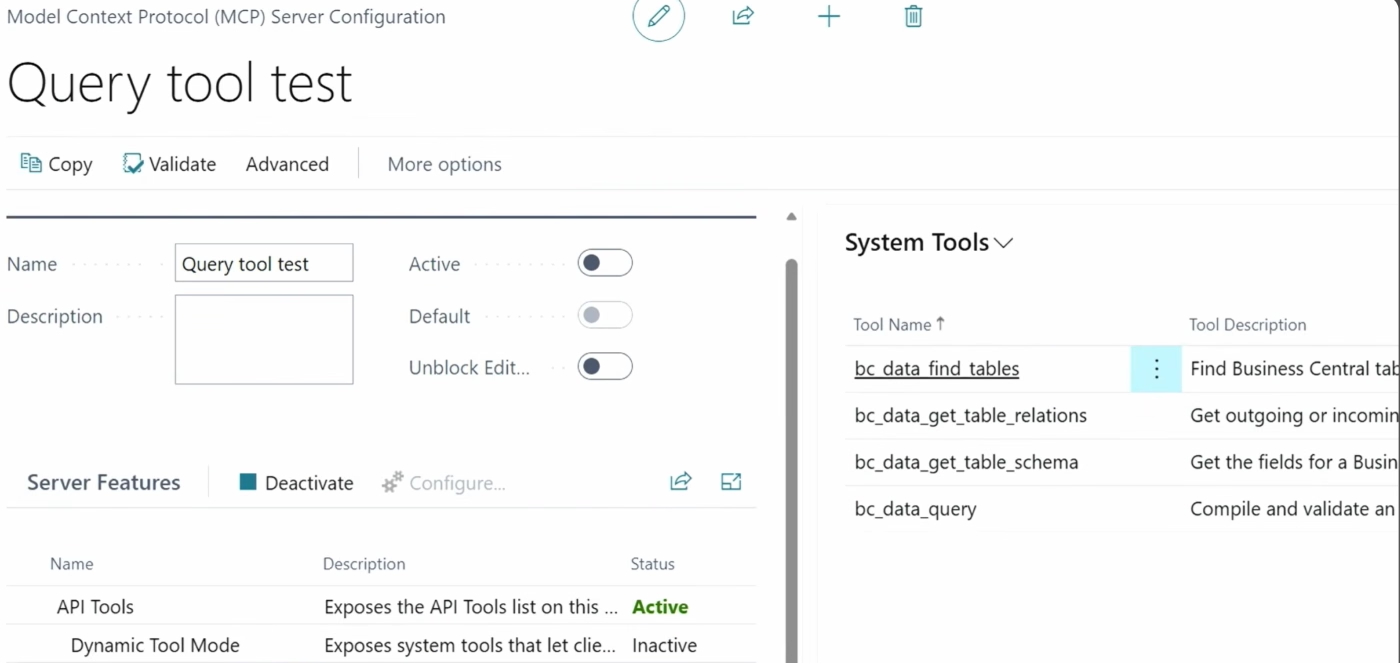
- Custom data queries through the Business Central MCP Server: New Model Context Protocol (MCP) tools let developers define, validate, and run custom data queries, so MCP-based applications and agents can retrieve Business Central data that is not exposed through an existing API.
- Updated Copilot chat experience (public preview): The chat panel is being redesigned to align with the broader Microsoft Copilot experience, giving users familiar interaction patterns across Business Central and other Microsoft applications.
Expense Agent expands in public preview
Microsoft first introduced the Expense Agent for Business Central in public preview during the spring, alongside native expense reports. Version 29.0 adds a substantial set of enhancements, all of which Microsoft labels as public preview.
- AI-driven approvals: The agent can evaluate submitted expense reports against approval policies written in natural language and give approvers guidance on potential policy violations or unusual patterns. This is designed for policies that are difficult to express as fixed thresholds, such as when business-class travel is acceptable. The final approval decision remains with the approver.
- Improved duplicate prevention: Duplicate detection has been strengthened to reduce the risk of the same expense being reimbursed twice.
- More flexible mileage calculation: Mileage rates can now account for date ranges and vehicle types, so reimbursement can reflect rate changes over time and differences between vehicles.
- VAT on expense reports: The agent can identify VAT-relevant expenses, calculate the applicable VAT, and include those amounts in reporting. When the capability is enabled, accountants must review and confirm the VAT calculation before posting. Microsoft’s roadmap lists general availability for December 2026.
- Withholding tax on expense reports: Withholding tax can be calculated automatically on employee expenses, including single or multiple taxes per category, simple or compound calculations, period-based thresholds, and calculations based on gross or net amounts. Microsoft’s roadmap lists general availability for April 2027.
- More countries and languages: Microsoft is extending the Expense Agent to all countries and regions where Business Central is available and adding Czech, Dutch, Finnish, Icelandic, Italian, Norwegian, and Swedish.
- Assigned projects only in the web app: Employees using the Expense Agent web app can be limited to the projects assigned to them, reducing coding errors on project-related expenses.

Financial management updates
Three finance features build on the tax and invoicing capabilities introduced in the spring. Microsoft lists all three as public preview.
- Multiple excise duties per item: A single item can now carry more than one excise duty configuration, such as a product subject to both plastic and sugar taxes. Business Central calculates every applicable duty during transactions, removing the need for duplicate item records or manual workarounds.
- Withholding tax for employee transactions: Withholding tax rules, previously focused on vendors, can now be applied to employee transactions, so employee-related payments and reimbursements receive consistent tax treatment.
- Vendor-specific number series for self-billing invoices: Organizations using self-billing can assign number series at the vendor level, extending the self-billed invoice capability introduced earlier in the year.

Shopify connector updates for Business Central
The Business Central and Shopify integration receives one of its larger updates in recent releases, with every ecommerce feature in version 29.0 listed as generally available.
- Shopify B2B on more plans: Shopify has extended core B2B capabilities beyond Shopify Plus, and the connector now supports company synchronization, B2B order processing, and market catalogs across those plans. When a B2B order arrives, the connector identifies the company and resolves the correct bill-to and ship-to customer based on the company location.
- Order changes, exchanges, and refunds: When a Shopify return includes a replacement item, the connector imports both the returned and exchange items onto a sales credit memo or sales return order. Users can post both lines together or move the exchange item to a separate sales document that remains linked to the original Shopify order.
- More control over sales document creation: Merchants can use the Shopify order number as the Business Central sales document number for easier traceability, review the selected billing and shipping contacts before creating documents, and choose whether refunds create sales credit memos or sales return orders. The latter option supports warehouse return processing, which credit memos alone did not.
- Tariff numbers and country of origin: Harmonized System (HS) codes and country or region of origin values can now synchronize between Business Central and Shopify, supporting customs reporting for merchants that sell internationally. Related improvements include a new Unlisted status for products created in Shopify.
- Keeping connections current: Microsoft also lists an update focused on keeping Shopify connections current, continuing the connector’s alignment with Shopify’s API lifecycle.

Reporting and data analysis updates
Reporting is one of the most significant areas of this release, with every feature listed as generally available. The changes concentrate on three themes: designing document reports, running financial reports, and governing how reports are used.
Document report design with the updated Word add-in
Most of the reporting changes center on the updated Word add-in, which gives users more structured tools for designing customer- and vendor-facing documents such as invoices, quotes, and orders without starting each layout from scratch.
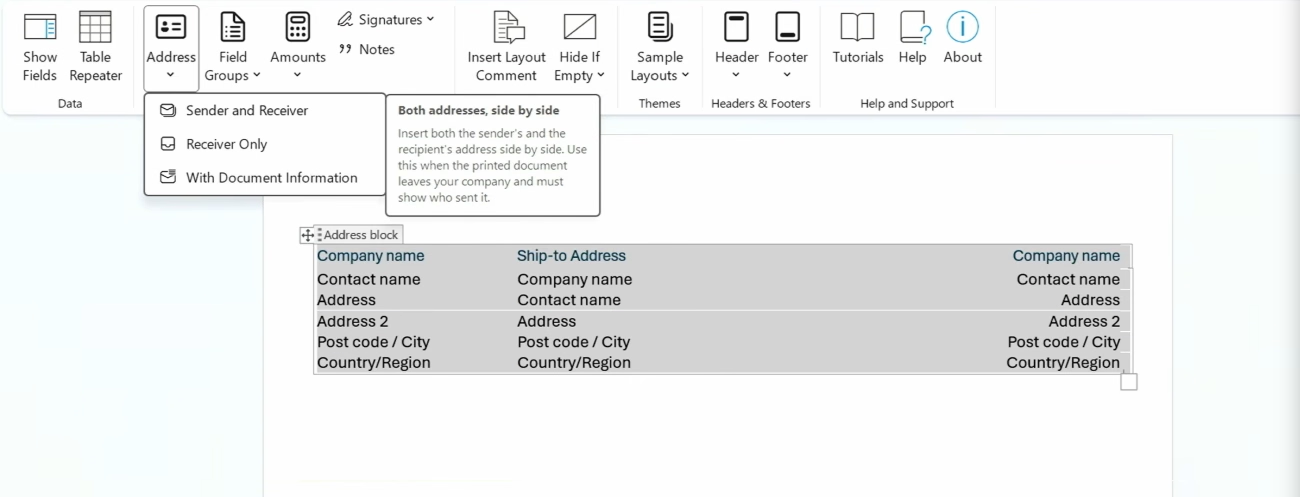
- New design controls: The updated Word add-in adds design controls for common document elements, including addresses, field groups, amounts, signature lines, and notes.
- Report themes and reusable headers and footers: A new composable layouts approach lets administrators apply report themes and reusable header and footer layouts across document reports, with defaults that can be set globally, per company, per report, or per layout.
- Conditional visibility: Users can show or hide content based on values in the report dataset.
- Sample documents for theme design: Microsoft has added samples such as invoices and pick lists to help organizations design and test report themes.
- New Document Report Experience: Microsoft lists this as a new optional feature in Feature Management, and it is disabled by default.
Financial reporting improvements
Financial reporting updates focus on reducing the manual effort involved in producing, distributing, and auditing recurring financial statements.
- Report packs: Finance teams can define packs containing multiple financial reports, then run them immediately or schedule delivery as a single PDF to report inboxes or by email.
- G/L account tracing: Users can trace where specific G/L accounts are used across financial reports.
- Change logging: Changes to financial report definitions are now always logged, which supports audit and change control.
Report automation and governance
Microsoft is also giving administrators more control over how reports are automated and which layouts users can access, alongside several smaller improvements to data analysis.
- Report inbox APIs: New APIs on the report inbox allow organizations to extend report automation with Power Automate or MCP.
- Layout lifecycle control: Administrators can control the lifecycle of all report layouts, including those included with Business Central and those delivered through per-tenant extensions or AppSource apps, to determine which layouts are available to end users.
- Analysis improvements: Users can bookmark list views and analysis tabs, use system audit fields in analysis mode and profiles, and work with less complex report datasets.
Supply chain and manufacturing updates
All supply chain management features in version 29.0 are listed as generally available, with subcontracting receiving the most attention.
Subcontracting improvements
Subcontracting in Business Central manufacturing gains three updates designed to reduce manual coordination with outside vendors.
- Instructions carried into purchase orders: Subcontracting comments and attachments added to standard tasks or routing operations now flow through the production order and onto the subcontracting purchase order as descriptive lines, so purchasing teams do not need to reenter production instructions.
- Easier setup and exploration: A new assisted setup guide in the Subcontracting app organizes configuration of work centers, vendors, locations, subcontractor prices, and supporting documentation. Updated demonstration data also illustrates intermediate and final subcontracting operations. In online environments, the app replaces the now-obsolete Subcontracting Worksheet.
- Inventory put-aways and picks: Subcontracting scenarios can now use inventory put-aways and picks, better connecting outsourced production with warehouse activity.

Warehouse, quality, and production updates
Beyond subcontracting, version 29.0 includes targeted improvements to inventory transfers, quality inspections, and everyday production tasks.
- Direct transfers from warehouse-enabled locations: Organizations can now set the direct transfer posting method per transfer route rather than relying on a single company-wide setting, and direct transfers support outbound warehouse scenarios including warehouse shipments and picks.
- Less manual work in quality inspections: The Quality Management extension now records passed or failed quantities automatically when an inspection is finished, prompts users to take ownership of unassigned inspections they edit, and provides clearer details when an inspection blocks a sale or consumption.
- Manufacturing documents and capacity calendars: Microsoft lists usability improvements for working with manufacturing documents and capacity calendars.
Sustainability management updates
Sustainability tracking continues to extend into more areas of Business Central, with all features listed as generally available.
- Service Management: Carbon footprint values now appear on service documents, drawing emissions data from items and resources consumed or delivered on service orders.
- Fixed assets: Emissions can be captured at acquisition and carried through reclassification and disposal, flowing into the sustainability ledger.
- Item journals and reclassification journals: New CO₂e fields let emissions follow the same lifecycle as item costs, with reclassification transferring emissions between items without adding new values.
- Specific carbon tracking method: In addition to the existing Average method, a new Specific method applies exact emission values to lot- or serial-tracked items, similar to specific costing.
- Formulas and reversals: Users can calculate emissions with formulas on purchase documents and reverse sustainability ledger entry transactions.

User experience, administration, and development updates
Several smaller updates improve day-to-day usability. Lookups now show recently used values, Tell Me displays recent searches, and images can be previewed directly in the web client. Administrators can turn SIFT indexes on or off and monitor Open in Excel usage through telemetry, while an improved data model for table extensions is designed to load data faster. On the Power Platform side, administrators can map new Dataverse fields in Business Central.
For developers, the most notable change is that Page Scripting is now generally available, adding multi-row selection and validation of message and error dialog text for repeatable user acceptance tests. The release also includes a large set of AL tooling updates, including running AL tests from the command line and CI/CD pipelines, default implementations for AL interfaces, AI-assisted debugging of recorded session failures, and new MCP capabilities for AL development.
Next steps
Version 29.0 is less about new modules and more about making recent investments ready for everyday use, with the agent, reporting, Shopify, and subcontracting updates likely to matter most to finance, ecommerce, and manufacturing teams. Because the Expense Agent and several finance features remain in public preview, organizations should test them in a sandbox before relying on them in production, and schedule the update before the February 2027 deadline. An experienced Dynamics 365 Business Central partner can help determine which capabilities to adopt first and how they fit existing processes and integrations.
Follow Dynamics101 for continued coverage of Business Central updates, roadmap changes, and independent analysis across the Microsoft Dynamics and Power Platform ecosystem.

