
The Dynamics 365 CRM 2026 release wave 2 brings new AI agents, Copilot integrations, and operational updates across seven Customer Engagement applications.
Microsoft has ended its twice-yearly release wave plans for Dynamics 365, but the Dynamics 365 CRM applications continue to receive a major fall update. In place of a formal Dynamics 365 CRM 2026 release wave 2 plan, Microsoft now publishes new capabilities individually on the AI at Work roadmap, where each feature moves through In Development, Rolling Out, and Launched stages as its rollout progresses.
The fall 2026 update pairs new AI agents with a substantial amount of operational functionality. Sales gains product and pricing rules for quotes along with shareable agent configurations, while Customer Service and Contact Center receive a broad set of quality evaluation improvements and new ways to bring service context into Copilot experiences. Field Service sees the largest set of changes, led by expanded asset maintenance planning, a new Subcontractor Agent, and tighter integration with Project Operations. In this post, we cover key updates for the following applications:
Dynamics 365 Sales
Sales agent configuration and AI data controls
The Dynamics 365 Sales 2026 release wave 2 updates focus on three areas: giving administrators more control over how AI agents are configured and what data they use, closing long-standing gaps in product configuration and pricing on quotes, and extending Dynamics 365 Sales into Microsoft’s broader Copilot experience. Three updates make it easier to roll out AI capabilities consistently and to govern where AI-generated insights come from.
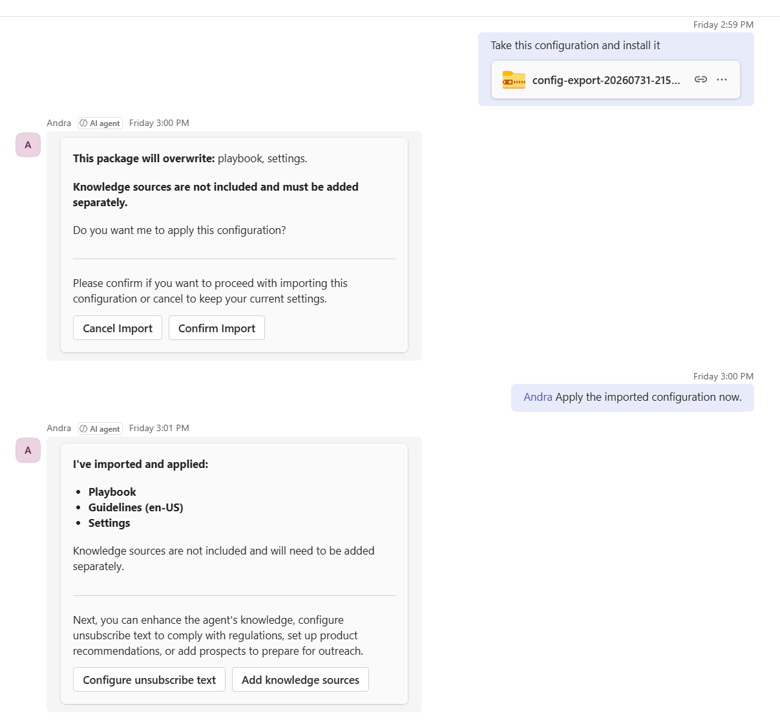
- Clone and share Sales Development agent configurations: Sales leaders can configure a Sales Development agent once and then distribute its playbook, guidelines, guardrails, and settings to other teams or business units. The configuration is exported and imported through a conversation with the agent in Microsoft Teams, and the result is a one-time copy rather than a synchronized connection, so later changes to the source agent are not applied to its copies. Knowledge sources such as uploaded documents, FAQs, and URLs are not included and must be added to each target agent separately.
- Choose the data sources AI-powered Data Enrichment uses: Administrators can now turn Outlook emails, Teams meetings, and a new CRM notes source on or off individually, and the agent keeps running as long as at least one source is active. Using CRM notes does not require tenant admin consent, but only notes added by users with a Dynamics 365 Sales Premium license are used. CRM notes is off by default for organizations already using the agent and on by default for new organizations.
- Onboard custom sources into Recommended Action: A guided wizard lets administrators register external insight sources so their recommendations appear alongside those from built-in agents. Actions from custom sources are normalized into the same action cards and ranked together with built-in actions, giving sellers a single prioritized list. The capability is not active until an administrator completes the registration flow.
Product configuration and pricing rules
Two quoting enhancements address scenarios that many organizations have historically handled with custom logic or third-party configure-price-quote (CPQ) tools.
- Product rules for composite products: Administrators can define compatibility, inclusion, and exclusion rules within a composite product, and sellers receive guidance while configuring that product for a customer. The rules apply at the level of a single quote line.
- Attribute-based and volume-based pricing rules: Administrators can add to a product’s list price based on its attributes and apply tiered or absolute volume discounts, helping organizations apply consistent pricing and discount policies.
Organizations evaluating these rules against an existing CPQ solution should note the single-quote-line scope, since rules that span multiple quote lines or products are not described as part of this update.
Seller experiences
Two additional updates reduce repetitive setup work for sellers and extend Dynamics 365 Sales into the Copilot experiences where many sales teams already spend their day, so sellers can start new deals faster and act on sales data without switching applications.
- Copy opportunities for repeat deals: When administrators enable the feature, sellers can duplicate an existing opportunity, including customer details, product lines with quantities and pricing, stakeholders, and custom fields. Inactive products are excluded and recorded in an audit summary, and outcome-related fields are reset so the new opportunity starts with an Open status at the first stage of the sales process.
- Sales plugin in Copilot Cowork: An updated Sales plugin brings additional Dynamics 365 Sales context, actions, and guided workflows into Copilot Cowork. The plugin’s skills use tools published through the Dynamics 365 MCP server and are deployed through an updated app package, giving administrators a governed way to manage the capability. Microsoft lists this capability as launched on its roadmap.
Dynamics 365 Customer Insights – Data
Unified customer profiles in Microsoft Fabric OneLake
The Dynamics 365 Customer Insights – Data 2026 release wave 2 update focuses on making unified customer profiles available to the rest of the organization through Microsoft Fabric. The change continues a broader pattern of OneLake connectivity across Dynamics 365 that includes the recently announced native Business Central integration with Microsoft Fabric and OneLake.
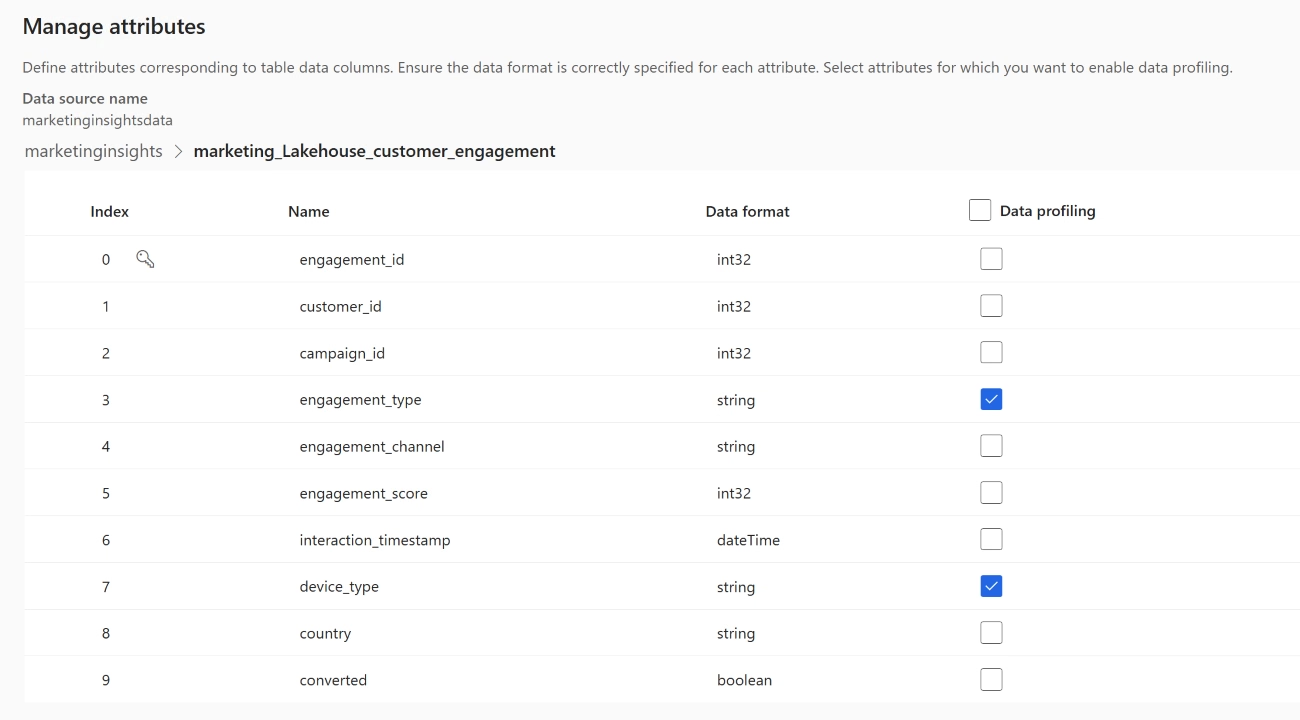
- Access unified profiles and insights in OneLake: Organizations using Fabric can create shortcuts to the profiles and insights stored in the Customer Insights – Data managed data lake, making them available to analytics and downstream processes without copying data. For organizations that already run analytics in Fabric, this reduces the need to maintain separate data lakes or export pipelines to put unified customer profiles to work in other departments.
Dynamics 365 Customer Insights – Journeys
New AI agents for building and timing journeys
The Dynamics 365 Customer Insights – Journeys 2026 release wave 2 updates introduce two new AI agents for building and timing customer journeys, along with more flexible message personalization.
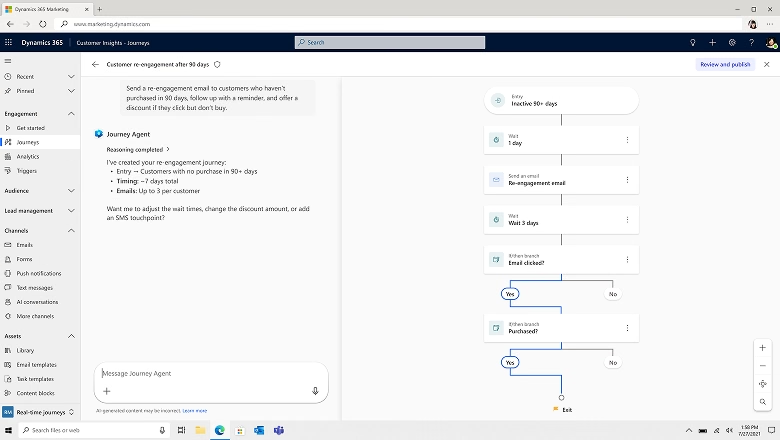
- Journey Creation Agent: Marketers describe the journey they want in plain language, and the agent asks follow-up questions to clarify intent before generating the journey’s audience, content, and structure.
- Outreach Optimization Agent: Added to a journey, this agent creates a baseline messaging plan from historical engagement patterns and then adjusts timing and cadence for each customer based on engagement or non-response, slowing, spacing out, or ending follow-ups as appropriate. Quiet time settings are enforced as a hard constraint, so messages are never sent outside approved communication windows.
Message personalization with Power Fx
Marketers have often had to clean up or reformat customer data at the source before it could be used reliably in emails and other messages. This update moves that work into the message itself, giving marketing teams more control over how personalized content appears without relying on data or IT teams to make changes.
- Personalization with Power Fx formulas: Marketers can apply Power Fx functions to text, numbers, and dates within messages, including concatenation, case changes, trimming, substitution, arithmetic, rounding, and formatting. This makes it possible to standardize names, localize date and number formats, or calculate values such as days until expiration without changing the underlying data model.
Dynamics 365 Customer Service
Quality evaluation enhancements
The Dynamics 365 Customer Service 2026 release wave 2 updates concentrate on two areas: making quality evaluation more accurate and flexible, and bringing service context and actions into Microsoft’s Copilot experiences. Five updates give quality managers more control over what is evaluated, how scores are calculated, and which results count toward reporting.
- Evaluate custom case-like records: On-demand quality evaluations can now be extended beyond the standard case table to supported custom Dataverse tables that follow a case-like service workflow, with administrators configuring where evaluations are launched. This capability is in public preview.
- Ground evaluation criteria in knowledge sources: Criteria questions can reference approved knowledge content, policies, or guidance, so quality checks reflect the organization’s expected handling standards. This preview capability is limited to case and on-demand evaluations.
- Detailed score breakdown: Evaluation details now show scoring at the overall, section, and question level, making it clear how individual answers contribute to the final score and where coaching or calibration may be needed.
- Not Applicable answer option: Criteria questions can be marked as not applicable, which excludes them from scoring instead of lowering the evaluation result when a criterion does not fit the case or interaction.
- Inactivate evaluation records: Quality managers can inactivate evaluations created in error, with the wrong criteria, or as duplicates. Inactive evaluations are preserved for traceability but excluded from overall scores and analytics.
Together, the score breakdown, Not Applicable option, and inactivation controls address a practical concern for quality programs: making sure that evaluation scores used for coaching and reporting reflect only valid, relevant assessments.

Customer Service in Copilot experiences
Following a similar approach to the Sales plugin, this update brings Dynamics 365 Customer Service into the Copilot experiences that service teams use alongside their core applications, so representatives can work with case information and take supported actions without switching back to Dynamics 365.
- Service tools, skills, and plugins for Copilot experiences: An updated Service application brings Dynamics 365 Customer Service context, actions, and guided workflows into supported Copilot experiences, including Chat, Cowork, Code, and Scout. The tools are delivered through a Service package on the Dynamics 365 MCP server, respect Dynamics 365 business logic, and apply the user’s existing permissions on every call. Microsoft tracks availability separately for each experience, so organizations should confirm which ones are available before planning a rollout.

Dynamics 365 Contact Center
Real-time translation and conversation quality evaluation
The Dynamics 365 Contact Center 2026 release wave 2 updates add built-in translation for digital channels and extend quality evaluation to give supervisors more control over which conversations are reviewed and who is evaluated.
- Out-of-the-box real-time translation on digital channels: Contact Center now includes a built-in translation service for digital conversations, so organizations no longer need to supply their own web resources to enable it. New configuration settings let service representatives read conversations in the language of their choice based on their skills and preferences.
- Recurring conversation evaluations: Quality evaluations for conversations were previously triggered only when a conversation closed. Organizations can now run evaluations on a recurring schedule, including bulk evaluations of previously closed conversations, ongoing evaluation of future conversations, and sampling of conversations that match configured conditions.
- Specify who to evaluate in a conversation: A new Participant evaluated option lets reviewers scope an evaluation to the entire transcript, the current conversation owner, or only the IVR or bot portion of the conversation. The option is available for on-demand evaluations from the conversation list and from an evaluation plan.
The ability to evaluate only the IVR or bot portion of a conversation is particularly relevant as more organizations route first contact through automated agents and need a way to assess that experience separately from human representatives. Organizations planning their contact center roadmap should also review what the Azure Communication Services retirement means for Dynamics 365 customers.
Dynamics 365 Field Service
Asset maintenance planning
The Dynamics 365 Field Service 2026 release wave 2 updates are the most extensive in this fall cycle. Microsoft is expanding asset maintenance planning, automating subcontractor closeout, improving mobile offline reliability, and extending the integration between Field Service and Project Operations. Four updates connect asset maintenance plans more directly to day-to-day service execution and capacity planning.
Taken together, these capabilities move Field Service further into preventive and usage-based maintenance territory. Organizations currently managing maintenance schedules in spreadsheets, custom solutions, or a separate asset management system should review where these features overlap with their existing processes before deciding where maintenance planning should live.
Subcontractor Agent for service report closeout
The new Subcontractor Agent addresses a common manual process in which dispatchers read emailed subcontractor reports and update bookings and work orders by hand.
- Closeout proposals from service reports: The agent processes supported emails and service reports, identifies the matching work order and active booking, and prepares a closeout proposal that can include status changes, a completion summary, work performed, notes, recommendations, follow-up requests, and labor duration.
- Human review before changes are applied: A dispatcher or service coordinator reviews the proposal against the original submission and applies the approved changes. Submissions from unauthorized senders, ambiguous matches, missing information, or messages without actionable closeout details are routed for human resolution rather than applied automatically.
- Processing photos, documents, and inspection results: Supported attachments such as photos, PDFs, inspection forms, and certificates are associated with the relevant work order, and the agent can extract inspection findings and task results for review. Unreadable, encrypted, oversized, or potentially unsafe files are flagged for handling rather than treated as processed.
The scope is limited to closing existing bookings and work orders. The agent does not create follow-up work, process invoices or payroll, or create product consumption records.
Scheduling, booking, and rental service
Dispatchers and service managers gain several updates that reduce manual scheduling effort, handle more complex booking scenarios, and keep time and cost records aligned with the work technicians actually performed. Rental organizations also get a new way to connect equipment operations with field service work.
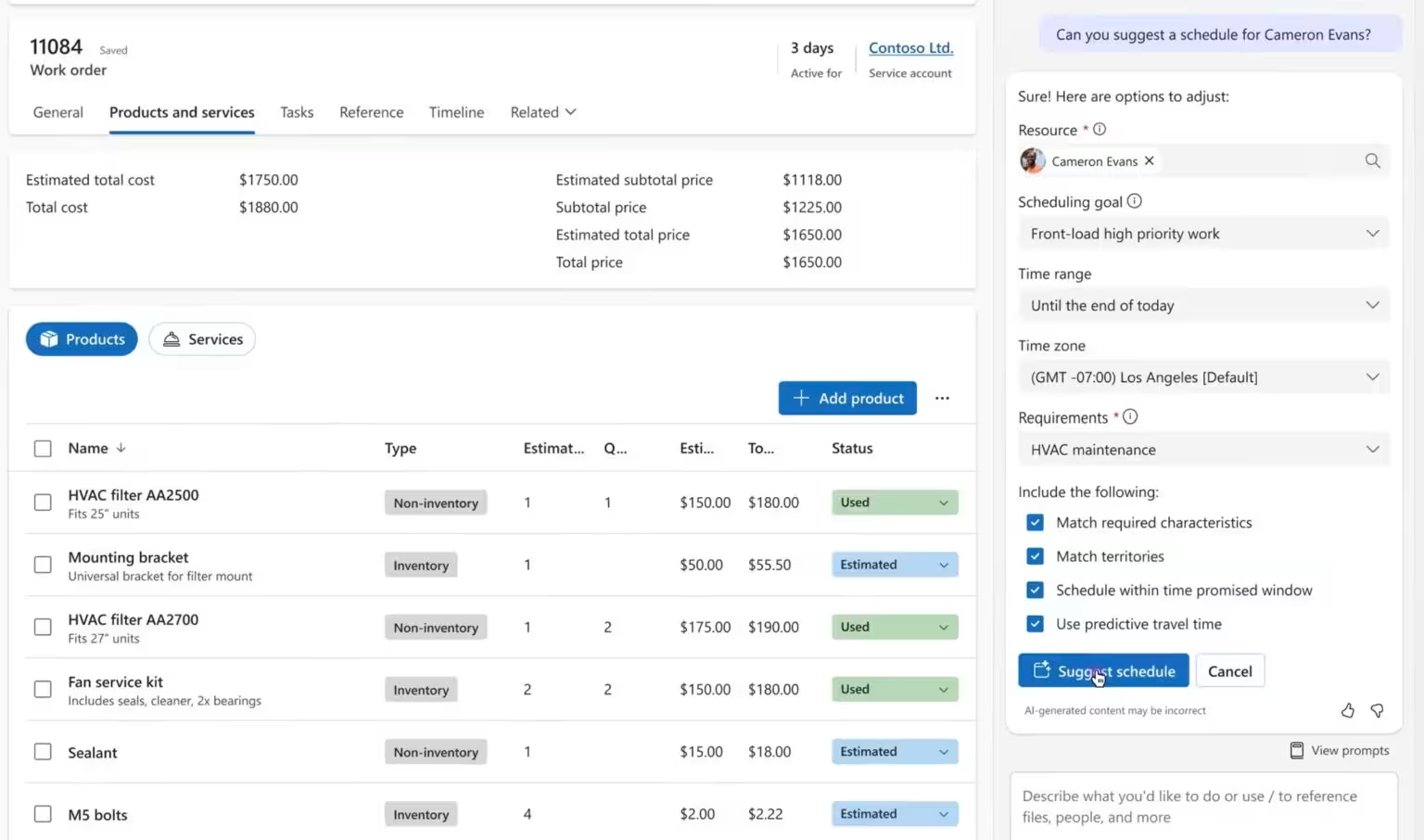
- Recurring optimizations with the Scheduling Operations Agent: The agent can now run optimization plans on a recurring schedule and apply the results automatically, and administrators can add and weight additional objectives within optimization goals. These capabilities build on the agent’s existing public preview and are enabled automatically for organizations that already use it.
- Book work orders with multiple requirements: A new booking experience lets dispatchers choose which resource requirement to schedule, with details such as duration, time windows, resource preferences, and booking status. Work orders with a single requirement continue directly to the configured scheduling experience.
- Preserve actual booking end times: A new organization-level setting controls whether Field Service overwrites a booking’s End Time when a technician marks it complete later. The default preserves current behavior, while changing the setting keeps the recorded end time intact so journals, time entries, and labor costs reflect when the work actually ended. The setting applies only to future completions.
- Rental service demand with work order requests: Fleet items and work order requests connect rental operations in Dynamics 365 Finance and Supply Chain Management with Field Service. Service needs can be captured and reviewed before a work order is created, giving rental organizations a controlled approval step before committing technicians and inventory.
Field Service mobile and Copilot improvements
Several updates target technician productivity and the reliability of the mobile app in low-connectivity environments.
- Microsoft Copilot in the Field Service mobile app: Technicians can ask natural-language questions about Field Service data, such as an asset’s work history or who last worked on a job, and organizations can extend the experience with custom agents.
- Modernized mobile offline foundation: Power Apps mobile and Field Service Mobile are moving to a more native foundation for offline data access and sync, with improvements to first sync, related-row handling, and resource loading for larger offline profiles.
- Adaptive sync and background up-sync: The app now responds more intelligently to weak or intermittent connectivity, supports background up-sync of changes captured in the field, and notifies users when changes are still pending.
- Optimized subgrid control: Product, service, and service task subgrids now support bulk adding records, marking all records as used or complete in one step, inline editing, and barcode scanning.
Administrators and makers remain responsible for offline profile design, so organizations with large or complex profiles should review table relationships, data volumes, and file usage as these changes roll out.

Field Service and Project Operations integration
Microsoft continues to close the gap between field execution and project financials. Most of these capabilities require the Field Service and Project Operations integration to be enabled.
- Project material plans in field execution: Material estimates created in a project plan can now create connected work order products, and supported changes stay synchronized in both directions.
- Project expenses from work orders: Technicians can create and submit project-related expenses from a work order on web or mobile, following the standard Project Operations approval process.
- Cost tracking for non-billable field work: Work orders can be connected to a project that acts as a financial container for internal maintenance or inspection work, without requiring a customer contract.
- Multiple warehouses per technician: Administrators can assign multiple warehouses to a bookable resource and set a default warehouse per legal entity. This capability applies to the Integrated deployment type, where Field Service works with Finance and Supply Chain Management through dual-write.
- Work Order Cost Summary: A new summary on the work order compares estimated and actual costs, sales, and project task progress, recalculating automatically as the work order moves through key statuses.
- Automatic project task completion: Work order types can be configured so that completing a work order also completes its linked project task.
- Control how services flow into project financials: An administrator setting determines whether work order services are recorded as time or material transactions.
- Multiple payers across work order lines: Billing responsibility can be assigned at the individual work order line level, supporting scenarios where a warranty provider, manufacturer, or partner pays for specific products or services.
Dynamics 365 Project Operations
Feature management and transaction journals
The Dynamics 365 Project Operations 2026 release wave 2 updates are smaller in number but address administration and transaction entry, alongside the Field Service integration improvements covered above.
- Feature management hub: Administrators in lite and resource/non-stocked deployments get a single place to browse features by status (New, Available, Enabled, or Coming soon), filter by product area, and review each feature’s benefits, dependencies, timing, and whether it is optional or reversible. End users can see newly available and enabled features with task-level guidance, and both groups receive advance notice of upcoming changes.
- Transaction journals: Users can enter time, expense, and material transactions in a single journal, preview the resulting journal lines, and confirm them to create the applicable cost, unbilled sales, and inter-organizational actuals without triggering an approval workflow. Confirmed journals are locked, and corrections use the existing correction journal process.
The feature management hub is particularly relevant given the shift to continuous roadmap publishing, since it gives Project Operations administrators an in-product view of what is coming rather than relying solely on external roadmap tracking.
What the fall 2026 update means for Dynamics 365 CRM customers
Three patterns stand out across this update. First, Microsoft is making AI agents easier to govern and distribute, from shareable Sales Development agent configurations and Data Enrichment source controls to a Subcontractor Agent that keeps a human reviewer in the loop before records change. Second, Dynamics 365 CRM context is moving into Copilot experiences outside the core applications, with Sales and Customer Service tools delivered through the Dynamics 365 MCP server. Third, quality management in Customer Service and Contact Center is maturing, with evaluation programs gaining the scoring transparency and data controls needed to support coaching and reporting at scale.
Enablement and availability also vary. Several capabilities, including Sales Development agent configuration sharing, opportunity copying, and custom Recommended Action sources, require administrator action before users see them, while some Customer Service quality evaluation features remain in preview. Licensing details matter in places as well, such as the Sales Premium requirement for notes used by AI-powered Data Enrichment. Because each roadmap entry now carries its own status, customers should check the current stage of any specific feature on the AI at Work roadmap rather than assuming everything in the fall update is generally available at the same time.
Planning for the Dynamics 365 CRM fall 2026 update
The Dynamics 365 CRM fall 2026 update, the cycle that would previously have been the Dynamics 365 CRM 2026 release wave 2, delivers meaningful changes across every major Customer Engagement application, even without a formal release wave plan to collect them in one place. Organizations should review which features apply to their environment, identify those that require administrator setup or specific licenses, validate changes in a sandbox before enabling them in production, and establish a regular review of the AI at Work roadmap to track rollout status going forward. Teams that want help prioritizing these updates and planning adoption can work with an experienced Dynamics 365 CRM partner to build a repeatable approach to continuous product change.

